

Markdown
- Name:
markdown - UI: Toast UI Editor (Docs)
- Data type:
markdown string
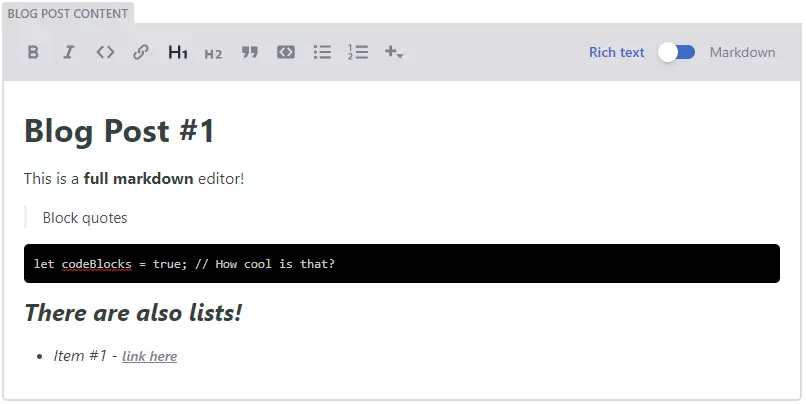
The markdown widget provides a full fledged text editor allowing users to format text with features such as headings and blockquotes. Users can change their editing view with a handy toggle button.
Please note: If you want to use your markdown editor to fill a markdown file contents after its frontmatter, you'll have to name the field body so the CMS recognizes it and saves the file accordingly.
Widget Options
For common options, see Common widget options.
| Name | Type | Default | Description |
|---|---|---|---|
| default | string | '' | Optional. The default value for the field. Accepts markdown content |
| media_library | Media Library Options | {} | Optional. Media library settings to apply when a media library is opened by the current widget. See Media Library Options |
| media_folder | string | Optional. Specifies the folder path where uploaded files should be saved, relative to the base of the repo | |
| public_folder | string | Optional. Specifies the folder path where the files uploaded by the media library will be accessed, relative to the base of the built site |
Media Library Options
| Name | Type | Default | Description |
|---|---|---|---|
| allow_multiple | boolean | true | Optional. When set to false, prevents multiple selection for any media library extension, but must be supported by the extension in use |
| config | string | {} | Optional. A configuration object that will be passed directly to the media library being used - available options are determined by the library |
| choose_url | string | boolean | true | Optional. When set to false, the "Insert from URL" button will be hidden |
Example
name: body
label: Blog post content
widget: markdown
This would render as:
Please note: The markdown widget outputs a raw markdown string. Your static site generator may or may not render the markdown to HTML automatically. Consult with your static site generator's documentation for more information about rendering markdown.
Shortcodes
Shortcodes can be added to customize the Markdown editor via registerShortcode.
Usage
CMS.registerShortcode('youtube', {
  label: 'YouTube',
  openTag: '[',
  closeTag: ']',
  separator: '|',
  toProps: args => {
    if (args.length > 0) {
      return { src: args[0] };
    }

    return { src: '' };
  },
  toArgs: ({ src }) => {
    return [src];
  },
  control: ({ src, onChange }) => {
    return h('span', {}, [
      h('input', {
        key: 'control-input',
        value: src,
        onChange: event => {
          onChange({ src: event.target.value });
        },
      }),
      h(
        'iframe',
        {
          key: 'control-preview',
          width: '420',
          height: '315',
          src: `https://www.youtube.com/embed/${src}`,
        },
        '',
      ),
    ]);
  },
  preview: ({ src }) => {
    return h(
      'span',
      {},
      h(
        'iframe',
        {
          width: '420',
          height: '315',
          src: `https://www.youtube.com/embed/${src}`,
        },
        '',
      ),
    );
  },
});